進階網頁設計|課程講義

生成前端視覺:
Pinterest、ChatGPT、Figma

・視覺骨架 課程推進架構

・ 視覺骨架 課程推進架構

event design
視覺骨架 課程推進架構

・課程規劃:生成前端視覺

階段宗旨: 將 PART 1 擬定的 PAS 導購文案與提案企劃,轉化為具備「工程轉換力」的 Figma UI 設計稿。本階段強調視覺風格靈感建立、AI 圖像資產精準生成,以及基於 CSS Flexbox 邏輯的 Figma Auto Layout 實作。

週次與核心標籤 單元教學主題 使用的工具與角色 學生實作任務與 Deliverables 重點 Prompt / 指令範例
W10

#參考
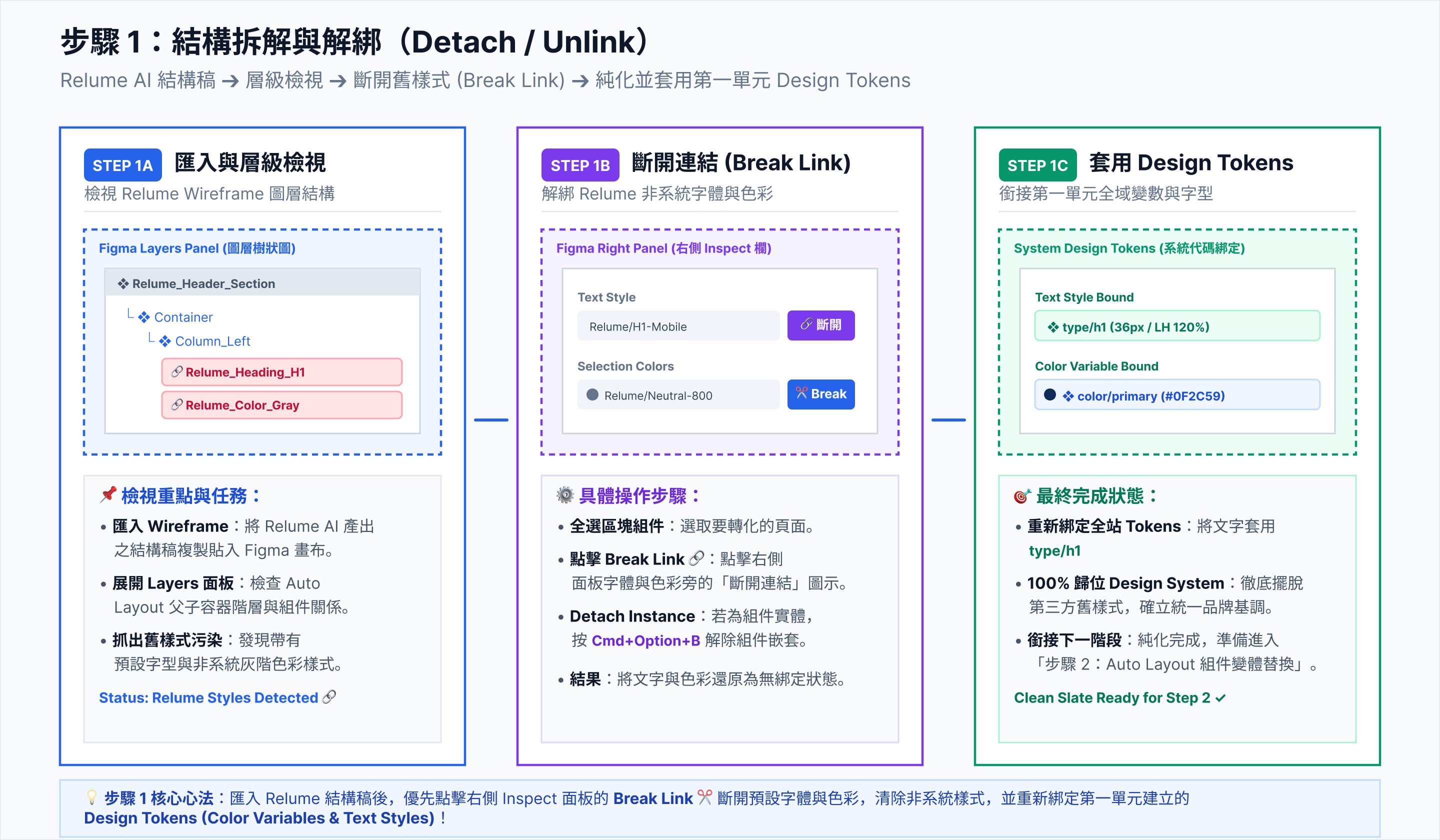
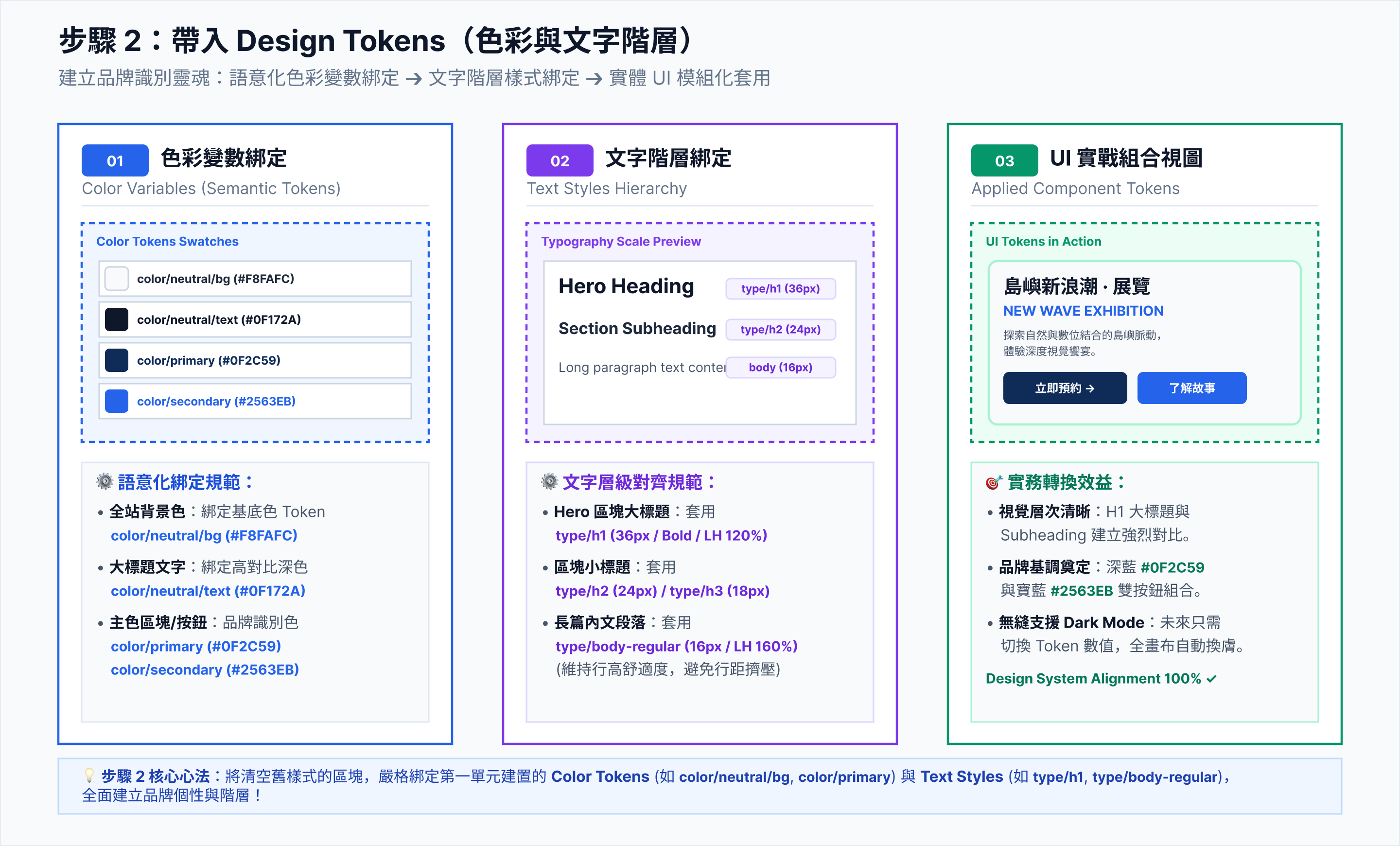
情緒板與視覺靈感對標
Visual Moodboard & Benchmarking
Pinterest 視覺靈感庫
Figma Moodboard 整理
  • 收集 10+ 份優秀電商與 SaaS 導購網頁。
  • 建立專案靈感畫板(Moodboard),確定 60-30-10 配色比例。
  • 定案字體 Hierarchy(標題/內文大小)。
(Pinterest 搜尋關鍵字範例)
"SaaS landing page dark mode glassmorphism", "Minimalist eCommerce UI hero section"
W11

#風格
AI 商業視覺資產生成
AI Asset & Image Generation
ChatGPT (Image2 / DALL-E 3)
Remove.bg 去背工具
  • 撰寫視覺提示詞,生成 Hero 區塊主視覺圖(3D渲染/高階商業攝影)。
  • 生成產品特點圖標 (Icons) 與情境背景圖。
  • 進行影像去背與向量轉檔(SVG)。
「請使用 DALL-E 3 生成一張 3D 渲染風格的健康護腰靠墊,放在北歐風極簡書房桌面上,柔和自然光,高質感,淺灰色微光漸層背景。」
W12 ~ W13

#視覺
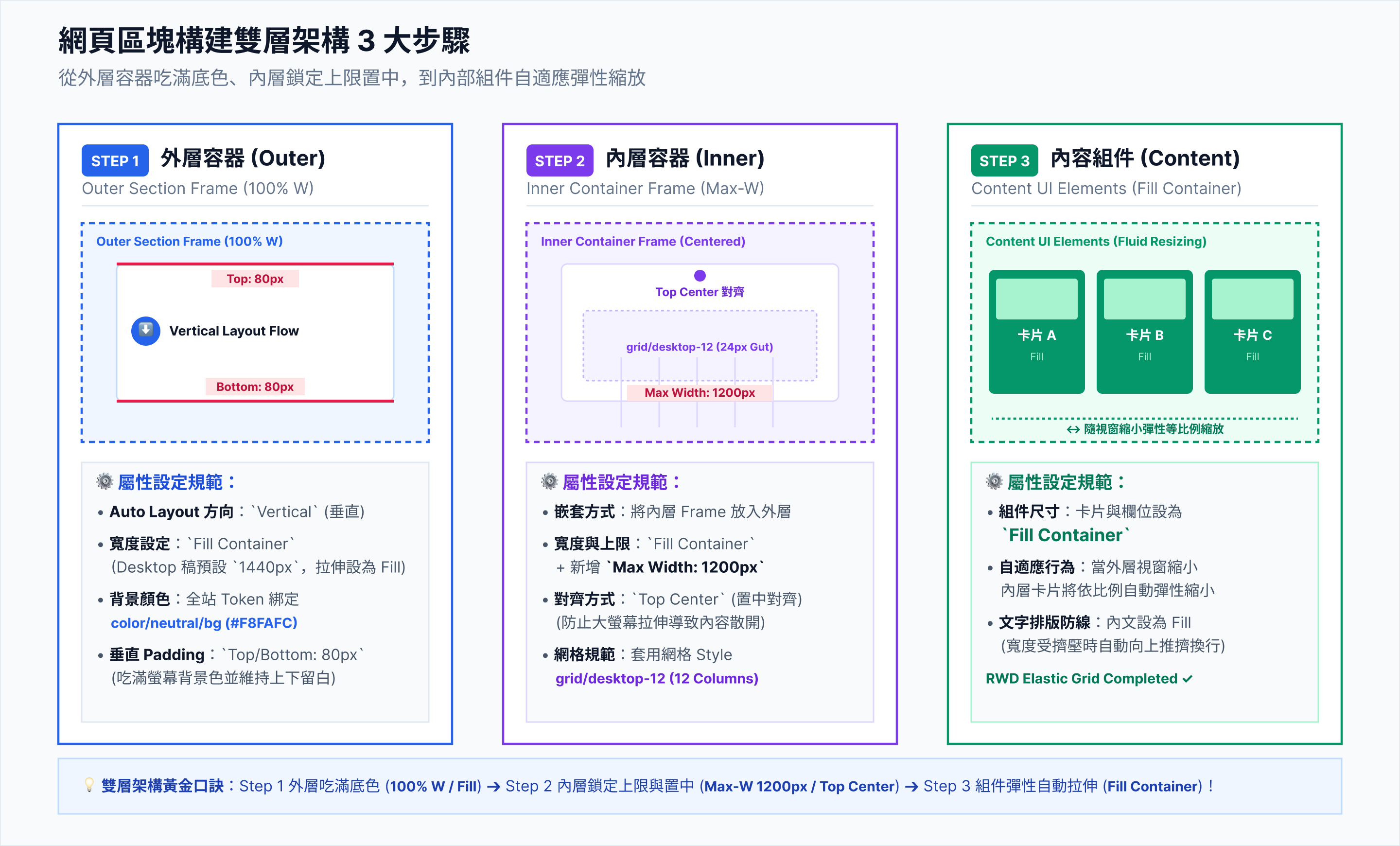
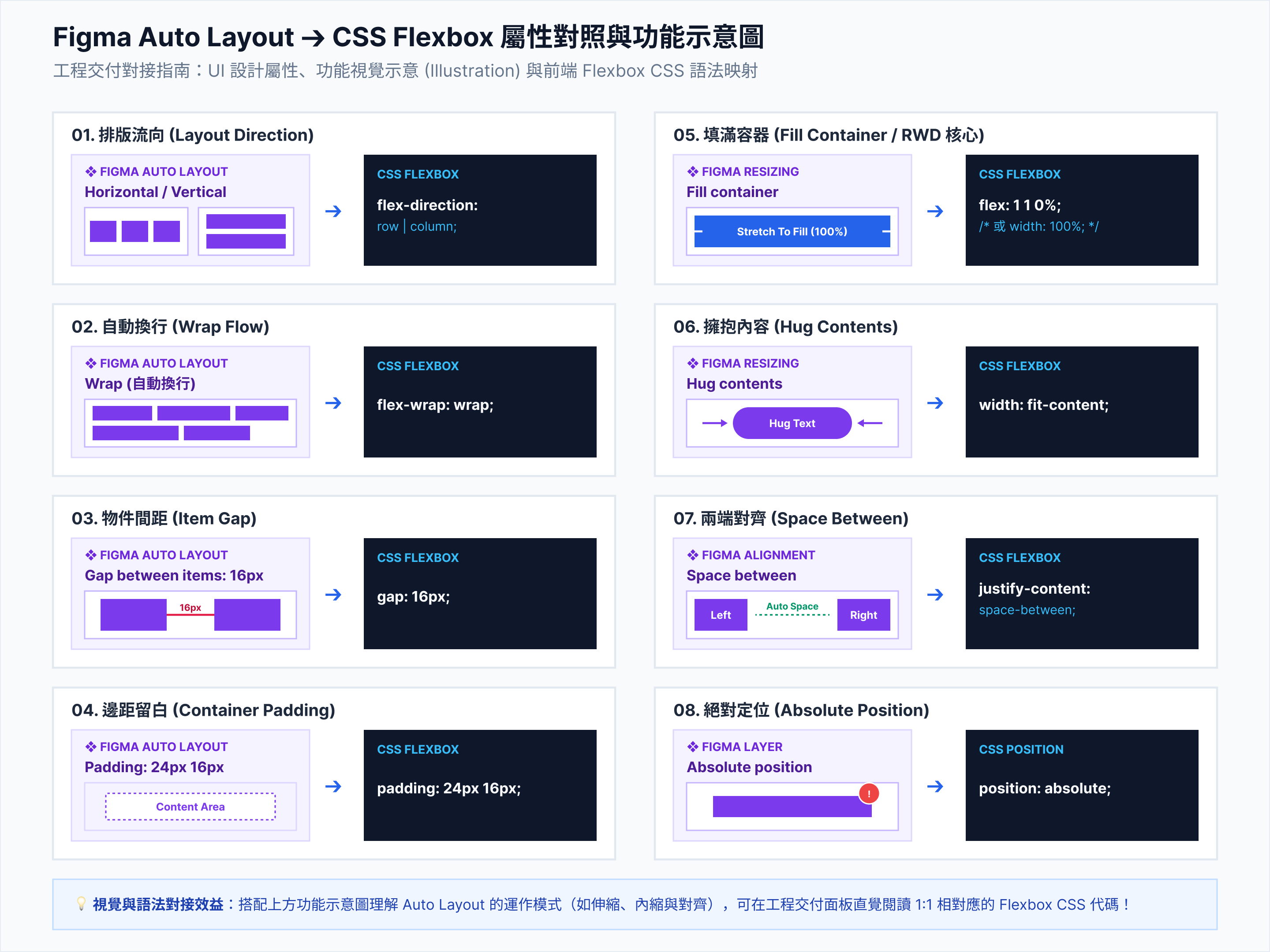
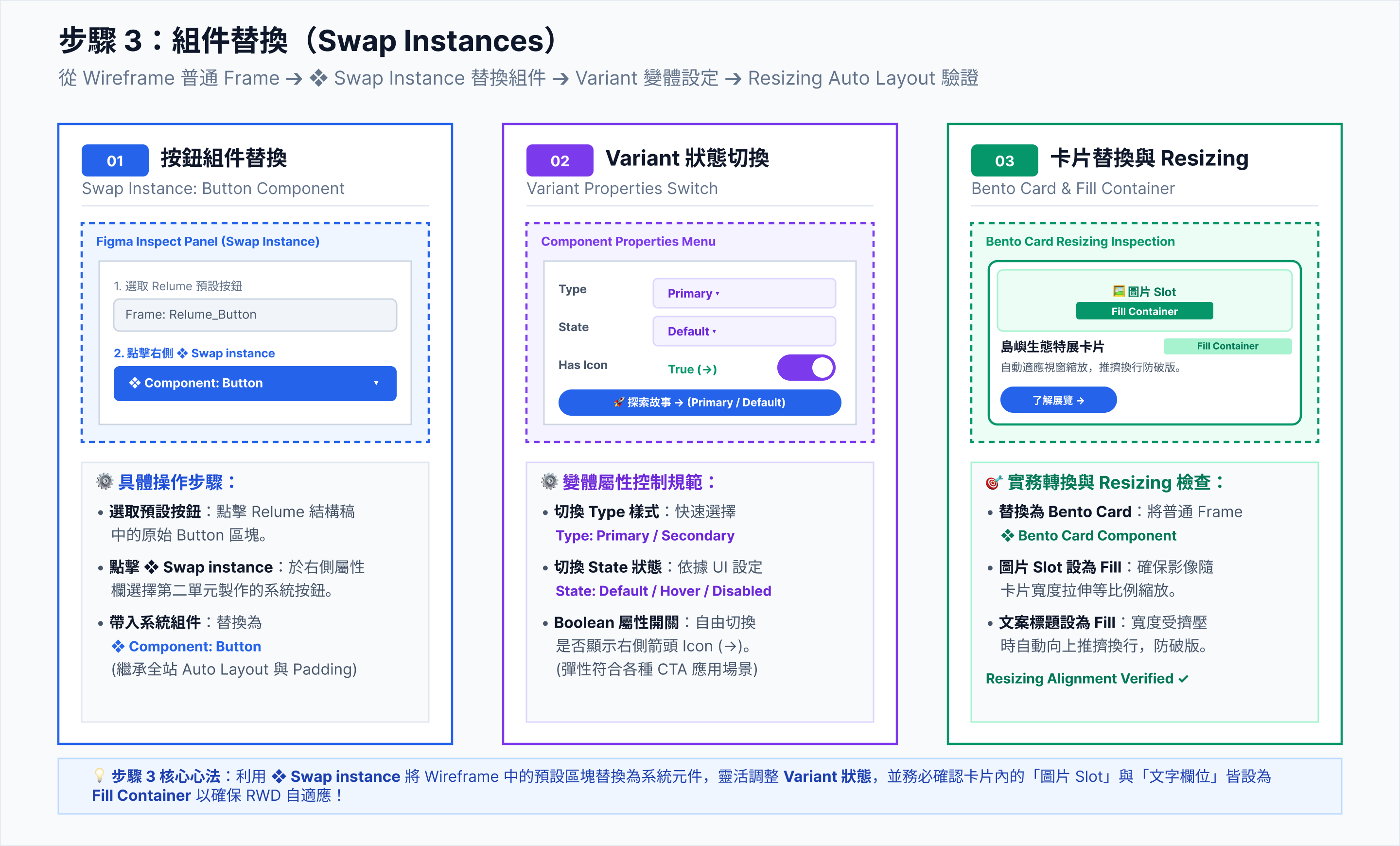
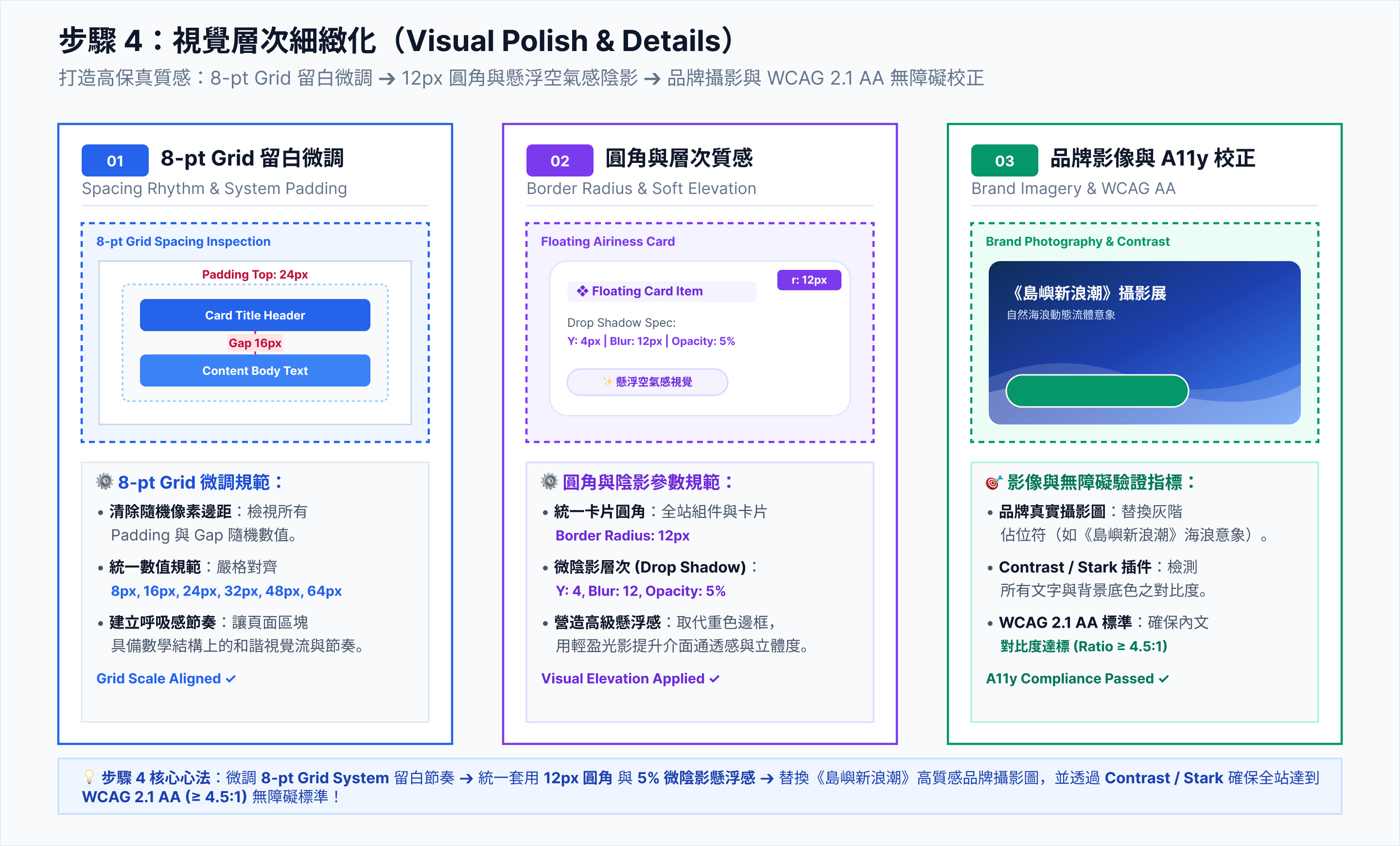
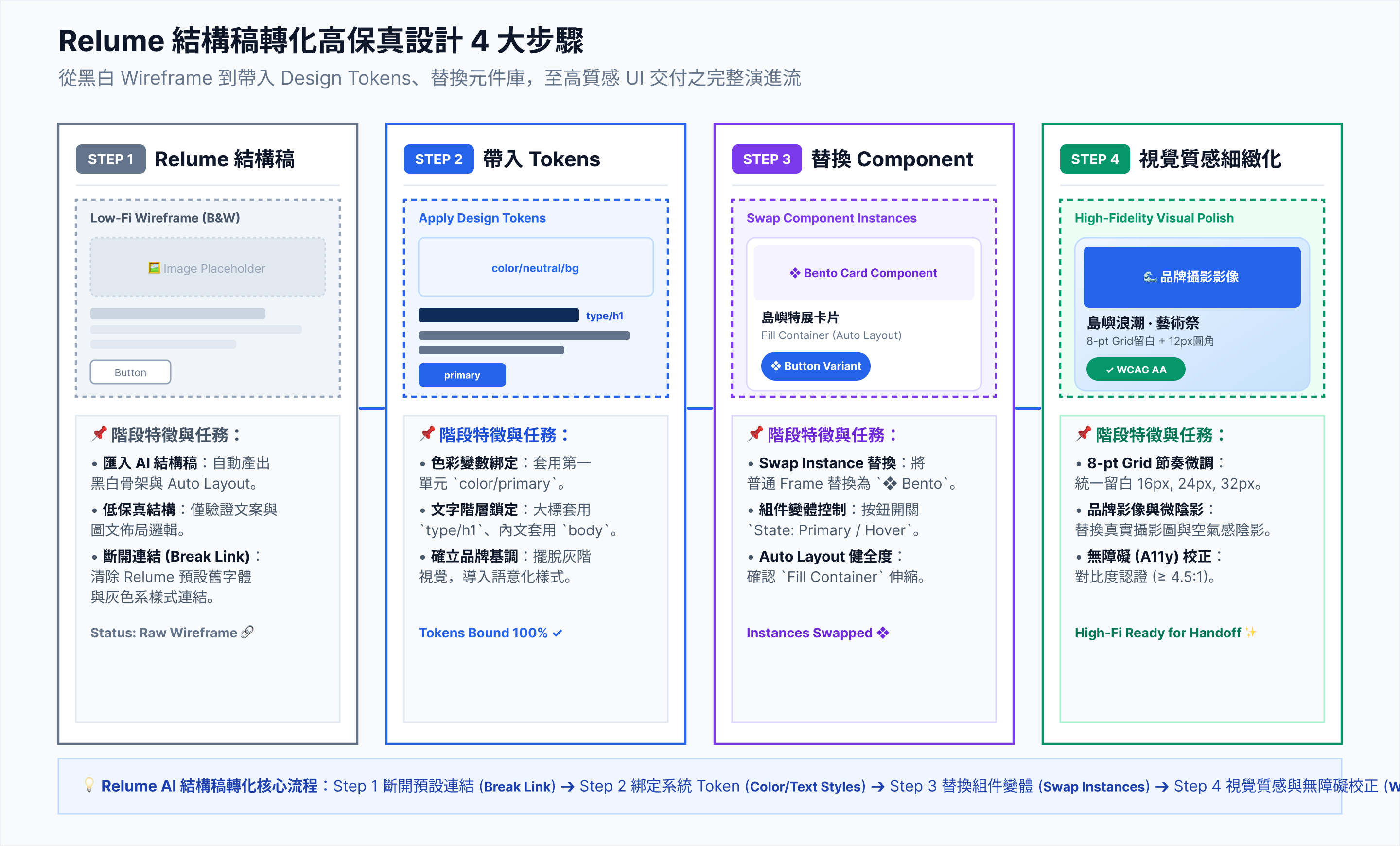
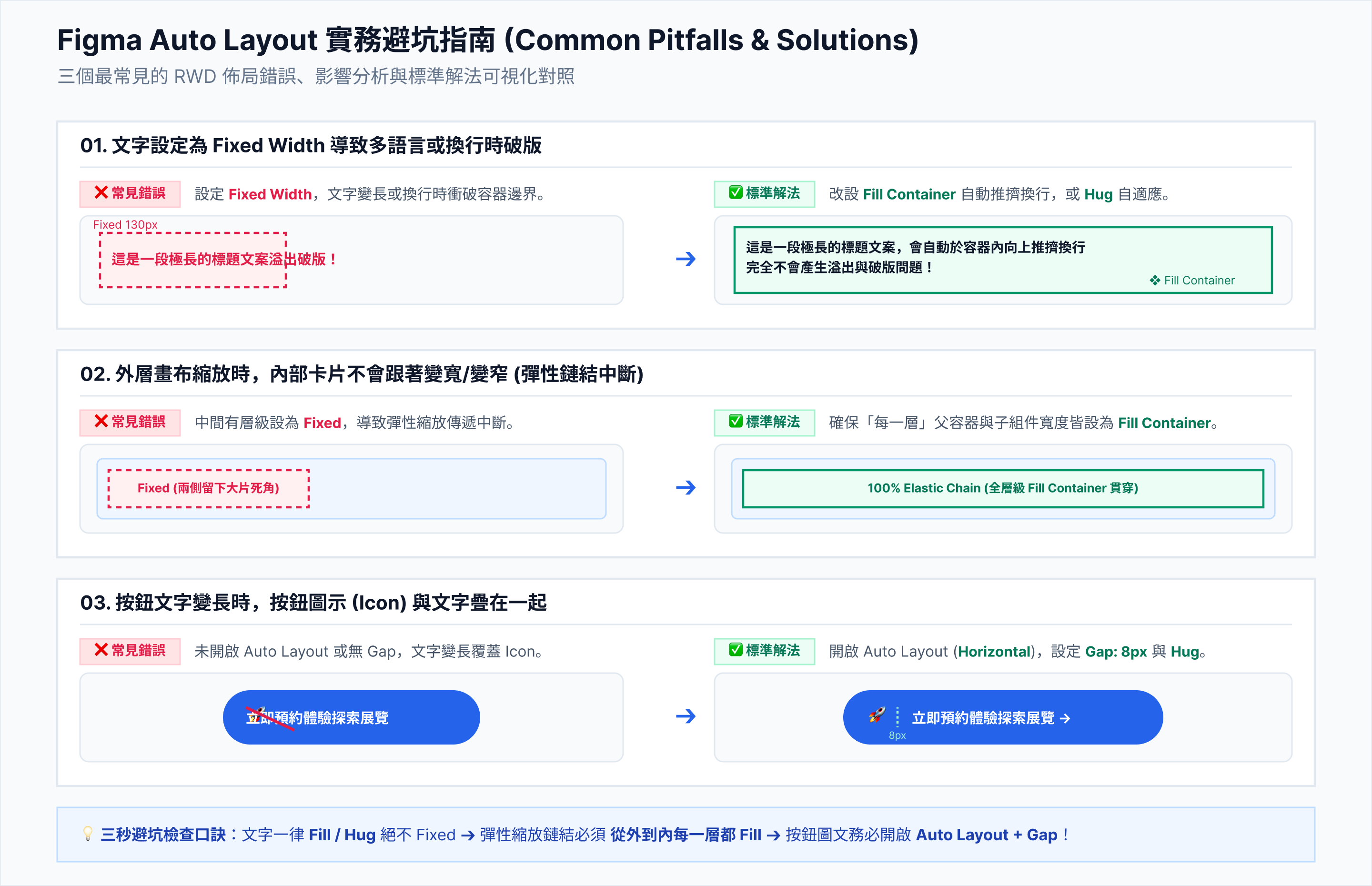
Figma Auto Layout 網頁骨架搭建
Design-to-Code Ready UI
Figma Auto Layout
Figma Plugins (Unsplash, Iconify)
  • 搭建 Header, Hero, PAS 痛點區、Pricing 與 FAQ 區塊。
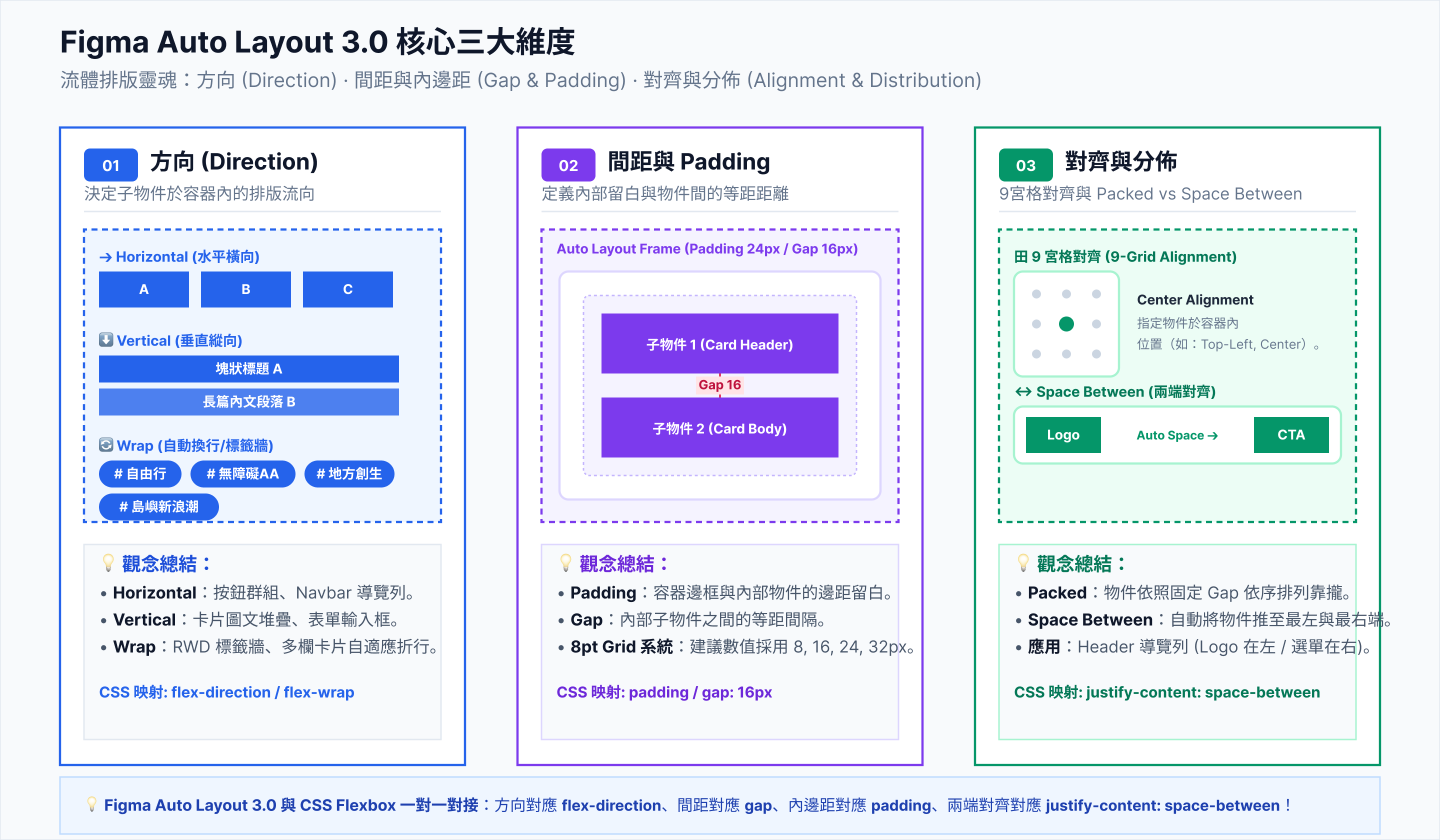
  • 全面套用 Auto Layout (Shift+A) 確立 Gap 與 Padding。
  • 交付物:Figma 1x 響應式 UI 設計稿與外帶標註檔
(Figma 佈局檢查原則)
• 容器設為 Vertical Flex
• 間距 (Gap) 設為 24px / 32px
• 邊距 (Padding) 設為 64px (Desktop)

・ 5 個案例全流程對照表:視覺風格、AI 繪圖與 Figma 排版策略

網站案例名稱與類型 W10:#參考 Moodboard 對標
(Pinterest 關鍵字與視覺風格)
W11:#風格 AI 視覺資產生成
(ChatGPT DALL-E 3 圖像提示詞)
W12-13:#視覺 Figma 網頁骨架
(Auto Layout & Flexbox 佈局策略)
實體商品
案例 1:ErgoMinimal
極簡遠距護腰靠墊網
  • 風格: 北歐極簡、柔和大地色系 (Minimal Warm)
  • 主色調: #F5F5F0 (米白) + #4A5568 (石墨灰)
  • Pinterest 參考: Japanese Minimalist Interior, Muji Furniture UI
"Minimalist ergonomic memory foam lumbar cushion placed on an oak wooden desk, warm ambient morning light, Scandinavian interior design, studio lighting, highly detailed 3D render, photorealistic, neutral tones, 8k --ar 16:9"
  • Hero 區塊: 雙欄 (Horizontal Flex),左文字 (Fill) + 右 3D 圖 (Fixed)。
  • PAS 痛點區: 3 卡片橫向 Auto Layout,卡片加圓角 16px 與 Drop Shadow。
數位服務
案例 2:AutoCollect SaaS
接案設計師自動催款平台
  • 風格: 現代暗黑玻璃擬態 (Dark Glassmorphism)
  • 主色調: #0F172A (深藍黑) + #6366F1 (霓虹紫)
  • Pinterest 參考: Linear App UI, Vercel Dashboard, Stripe Glass
"Modern SaaS dashboard isometric preview, glowing neon purple glassmorphic cards, invoice tracking interface, dark mode UI, clean typography, 3D abstract shapes floating, tech style, 8k --ar 16:9"
  • Hero 區塊: 置中單欄 (Vertical Flex),加上背景氛圍圓形 Glow。
  • 功能演示: 置入玻璃卡片 Frame (透明度 70% + stroke 薄光邊框)。
實體商品
案例 3:CleanBite Eats
100% 無麩質舒肥即食餐網
  • 風格: 清新有機、活潑明亮 (Fresh Organic)
  • 主色調: #F0FDF4 (薄荷白) + #166534 (森林綠)
  • Pinterest 參考: Organic Food Landing Page, HelloFresh UI
"Gourmet gluten-free sous-vide chicken breast dish with fresh avocado and quinoa salad, commercial food photography, bright natural lighting, marble tabletop background, top view, Michelin star presentation --ar 16:9"
  • Hero 區塊: 左大字 CTA + 右圓形美食照片 Mask。
  • 信任標籤區: 採用 Inline Flex,橫排 4 個認證 Badge (無麩質/零防腐)。
實體/訂閱
案例 4:SeniorCat Care
高齡貓 PH 顯色健檢貓砂網
  • 風格: 溫馨同理、粉彩馬卡龍 (Warm Pastoral)
  • 主色調: #FFFBEB (奶油白) + #059669 (薄荷綠)
  • Pinterest 參考: Pet Care UI Design, Cute Japanese Branding
"Cute senior fluffy cat resting comfortably next to a clean cat litter box, soft pastel lighting, warm and empathetic atmosphere, high resolution photography, cozy home environment --ar 16:9"
  • Hero 區塊: 雙欄對齊,文字區加上貓爪圖示小標籤。
  • 比較表格區: 建立 2 欄 Auto Layout Table,凸顯顯色健檢效益。
數位產品
案例 5:ExecSlide AI
麥肯錫級商務簡報組件網
  • 風格: 高級商務、專業雜誌排版 (Editorial Luxury)
  • 主色調: #1E293B (深石板灰) + #38BDF8 (天藍高光)
  • Pinterest 參考: Pitch.com UI, McKinsey Report Typography
"Professional business presentation slides floating in 3D space, sleek bar charts and infographics, dark blue background, luxury corporate style, high contrast, clean typography --ar 16:9"
  • Hero 區塊: 大字 Title (48px) + 置中按鈕,底下擺放簡報卡片 Gallery。
  • 組件預覽區: 採用 Grid Auto Layout (3 欄組件動態網格)。

・10 個不同類型網站案例:Pinterest 關鍵字與 ChatGPT 視覺指令對照表

使用說明: 本表涵蓋 10 種不同產業類型(硬體、SaaS、美食、寵物、數位資產、美妝、健身、作品集、豪宅房產、永續時尚)。可直接複製 Pinterest 關鍵字做為 Moodboard 靈感對標,或將 ChatGPT Prompt 輸入生成 Hero 區塊視覺圖與 Figma 設計模板藍圖。

案例類型與名稱 📌 Pinterest 視覺風格搜尋關鍵字
(W10:中英對照 Moodboard 對標)
🤖 ChatGPT 網站設計模板生成指令
(W11~W12:中英對照 DALL-E / Web Design Prompt)
01. 實體硬體
人體工學護腰靠墊
(Ergonomic Hardware)
🇹🇼 中文關鍵字: 日本極簡居家、北歐木質書房、人體工學椅 UI 設計、無印風格網頁、極簡產品 Landing Page
🇺🇸 English Keywords: Japanese Minimalist Interior, Nordic Wooden Study, Ergonomic Chair UI Design, Muji Style Web Design, Minimalist Hardware Landing Page
🇹🇼 中文 Prompt 指令: 請生成一個極簡日系風格的 Landing Page 視覺模板。整體採用暖米色 (#F5F5F0) 與石墨灰,包含雙欄 Hero 區塊:左側為強烈的大標題與 CTA 按鈕,右側為放置於橡木書桌上的 3D 渲染護腰靠墊,展現柔和自然光與高質感居家氛圍。
🇺🇸 English Prompt Instruction: Generate a minimalist Japanese-style Landing Page design template. The overall scheme uses warm beige (#F5F5F0) and graphite gray, featuring a two-column Hero section: the left side has a bold headline and CTA button, while the right side displays a 3D rendered ergonomic lumbar cushion on an oak desk under soft natural morning light with a high-end cozy home ambiance.
02. SaaS 軟體
自動催款平台
(B2B SaaS Platform)
🇹🇼 中文關鍵字: 現代暗黑玻璃擬態、SaaS 儀表板 UI、Linear 風格網頁、霓虹紫 UI 介面、科技風 Landing Page
🇺🇸 English Keywords: Modern Dark Glassmorphism, SaaS Dashboard UI, Linear Style Web Design, Neon Purple UI Interface, Tech Landing Page
🇹🇼 中文 Prompt 指令: 請生成一個現代暗黑玻璃擬態 (Dark Glassmorphism) 風格的 SaaS 網頁模板。背景採用深藍黑 (#0F172A) 搭配發光霓虹紫漸層,Hero 區塊為置中大標題,下方懸浮著微透明的 3D 儀表板卡片與漸層邊框,展現高科技且俐落的前端介面。
🇺🇸 English Prompt Instruction: Generate a modern Dark Glassmorphism SaaS website design template. The background uses dark slate blue (#0F172A) with glowing neon purple gradients. The Hero section features a centered bold title with a floating semi-transparent 3D dashboard card beneath it, complete with subtle gradient borders, exuding a sleek, high-tech frontend interface.
03. 健康餐飲
無麩質舒肥即食餐
(Health Food E-commerce)
🇹🇼 中文關鍵字: 清新有機網頁設計、健康餐點商業攝影、綠色系 UI 佈局、簡約美食商城、舒肥料理 Landing Page
🇺🇸 English Keywords: Fresh Organic Web Design, Healthy Food Commercial Photography, Green UI Layout, Minimalist Food E-commerce, Healthy Meal Landing Page
🇹🇼 中文 Prompt 指令: 請生成一個清新有機風格的健康餐包導購網頁模板。採用薄荷白 (#F0FDF4) 與森林綠主色,Hero 區塊左側呈現大膽的標題與品質認證標籤,右側為高解析度的米其林級舒肥雞胸肉餐盒攝影圖,整體氛圍明亮、自然且令人食欲大開。
🇺🇸 English Prompt Instruction: Generate a fresh and organic style healthy meal landing page template. Use mint white (#F0FDF4) and forest green as primary colors. The Hero section features bold headlines and quality certification badges on the left, paired with a high-resolution commercial photograph of a Michelin-grade sous-vide meal box on the right, radiating a bright, natural, and appetizing vibe.
04. 寵物用品
高齡貓健檢豆腐砂
(Pet Care & Subscription)
🇹🇼 中文關鍵字: 溫馨日系寵物網頁、馬卡龙色系 UI、可愛質感貓咪電商、寵物品牌設計、柔和綠配色網頁
🇺🇸 English Keywords: Cozy Japanese Pet Website, Pastel UI Design, Cute Luxury Cat E-commerce, Pet Brand Identity Design, Soft Mint Pet UI
🇹🇼 中文 Prompt 指令: 請生成一個溫馨同理風格的高齡貓寵物貓砂網站模板。採用奶油白 (#FFFBEB) 搭配柔和薄荷綠,Hero 區塊左側展示同理心標題與貓爪圖示標籤,右側為一隻舒適趴在乾淨豆腐砂盆旁的可愛高齡貓攝影圖,展現溫暖、安心與高質感的日本品牌風格。
🇺🇸 English Prompt Instruction: Generate a warm and empathetic pet cat litter website template for senior cats. Utilize cream white (#FFFBEB) paired with soft mint green. The left Hero section displays empathetic headlines with cat paw icons, while the right features a cozy photograph of a senior cat resting comfortably next to a clean litter box, embodying a warm, trustworthy, and premium Japanese brand vibe.
05. 數位產品
商務簡報組件庫
(Digital Asset Platform)
🇹🇼 中文關鍵字: 高級商務簡報 UI、Pitch 風格網頁、黑色雜誌風排版、高對比圖表介面、專業諮詢風格 UI
🇺🇸 English Keywords: Executive Business Presentation UI, Pitch Style Web Design, Editorial Luxury Layout, High Contrast Chart Interface, McKinsey Style Web Design
🇹🇼 中文 Prompt 指令: 請生成一個高級商務雜誌風格的數位簡報模板下載網頁。採用深石板灰 (#1E293B) 與天藍高光,Hero 區塊包含 48px 大字標題與置中 CTA 按鈕,下方呈列著懸浮在 3D 空間中的麥肯錫風格商業圖表簡報卡片,視覺極具專業力與高層信任感。
🇺🇸 English Prompt Instruction: Generate an executive editorial-style digital template download web page. Use deep slate gray (#1E293B) accented with sky blue highlights. The Hero section contains a bold 48px title and centered CTA button, with a gallery of 3D floating McKinsey-style corporate presentation cards beneath it, delivering an ultra-professional and trustworthy corporate feel.
06. 美妝保養
高階極簡純素保養品
(Luxury Skincare)
🇹🇼 中文關鍵字: 極簡美妝網頁設計、高級感柔色保養品 UI、Clean Beauty 電商、無印質感保養、優雅襯線體網頁
🇺🇸 English Keywords: Minimalist Beauty Web Design, Luxury Nude Skincare UI, Clean Beauty E-commerce, Editorial Cosmetics Web, Serif Luxury Web Layout
🇹🇼 中文 Prompt 指令: 請生成一個 Clean Beauty 極簡高階保養品的商城 Landing Page 模板。使用溫暖裸粉色 (#FAF4F0) 與玫瑰金,Hero 區塊為優雅的襯線體 (Serif) 大標題,搭配高清磨砂玻璃瓶裝精華液的商業攝影圖與光影投射,傳達純素、奢華與純淨的視覺氛圍。
🇺🇸 English Prompt Instruction: Generate a Clean Beauty luxury skincare e-commerce Landing Page template. Utilize warm nude pink (#FAF4F0) paired with rose gold accents. The Hero section features an elegant Serif headline alongside a high-resolution commercial photograph of a frosted glass serum bottle under soft shadow interplay, conveying a vegan, luxurious, and pure aesthetic.
07. 健身運動
身心靈瑜伽訂閱 App
(Wellness & Fitness)
🇹🇼 中文關鍵字: 現代健身 App 網頁、身心靈瑜伽 UI、活力漸層網頁設計、莫蘭迪色健身、流線型介面排版
🇺🇸 English Keywords: Modern Fitness App Website, Mindful Yoga UI, Vibrant Gradient Web Design, Morandi Tone Fitness UI, Curved UI Layout
🇹🇼 中文 Prompt 指令: 請生成一個現代身心靈瑜伽訂閱平台的網頁視覺模板。採用低飽和莫蘭迪鼠尾草綠 (#E2E8F0 / #94A3B8) 與晨光橙漸層,Hero 區塊包含流暢的流線型 Auto Layout 卡片,右側為女性在日出時靜心瑜伽的高畫質影像,營造放鬆、平靜且充滿活力的風格。
🇺🇸 English Prompt Instruction: Generate a modern mindful yoga subscription platform web design template. Use low-saturation Morandi sage green and sunrise orange gradients. The Hero section features smooth curved Auto Layout cards on the left, paired with a high-definition photograph of a woman practicing yoga at sunrise on the right, creating a calming, serene, and energizing atmosphere.
08. 個人作品集
UI/UX 設計師工作室
(Portfolio & Studio)
🇹🇼 中文關鍵字: 個人作品集 UI 設計、極簡大字體網頁、互動式 Portfolio、新粗獷主義網頁、黑色前衛排版
🇺🇸 English Keywords: Personal Portfolio UI Design, Minimalist Kinetic Typography Web, Interactive Portfolio, Neo-Brutalism Web Design, Edgy Dark Mode Portfolio
🇹🇼 中文 Prompt 指令: 請生成一個新銳 UI/UX 設計師的個人作品集 Hero 區塊模板。採用高對比純黑白色調 (#000000 與 #FFFFFF) 搭配螢光黃高光,主視覺為超大字級的動態英文字體 (Kinetic Typography) 與 Hover 懸浮作品卡片,展現前衛、充滿個人特色與極致的設計力。
🇺🇸 English Prompt Instruction: Generate a cutting-edge UI/UX designer personal portfolio Hero section template. Use high-contrast monochrome (#000000 & #FFFFFF) accented with electric yellow highlights. The main layout features oversized kinetic typography paired with interactive floating project preview cards, showcasing an edgy, unique, and powerful design aesthetic.
09. 頂級房產
奢華豪宅建案預售網
(Luxury Real Estate)
🇹🇼 中文關鍵字: 豪宅建築網頁設計、黑色奢華地產 UI、建築攝影網頁版面、尊榮建案 Landing Page、金色暗黑網頁
🇺🇸 English Keywords: Luxury Real Estate Web Design, Dark Architectural UI, Architectural Photography Web Layout, Premium Property Landing Page, Gold Obsidian Web Design
🇹🇼 中文 Prompt 指令: 請生成一個頂級奢華住宅建案的官網 Landing Page 模板。採用曜石黑 (#0B0F17) 搭配香檳金邊框,Hero 區塊為全螢幕沉浸式的現代建築光影攝影圖,疊加微透明黑色漸層遮罩與典雅的金色襯線體標題,營造尊榮、頂級與建築美學的氣勢。
🇺🇸 English Prompt Instruction: Generate an ultra-luxury real estate development landing page template. Use obsidian black (#0B0F17) with champagne gold border accents. The Hero section features a full-screen immersive architectural photography background overlaid with a subtle dark gradient mask and elegant gold Serif titles, evoking an exclusive, high-end, and architectural grandeur.
10. 永續服飾
獨立環保服飾品牌
(Sustainable Fashion)
🇹🇼 中文關鍵字: 永續時尚網頁設計、大地色服飾電商 UI、雜誌風服裝商城、復古質感網頁、有機棉服飾 Landing Page
🇺🇸 English Keywords: Sustainable Fashion Web Design, Earthy Fashion E-commerce UI, Editorial Apparel Store, Retro Aesthetic Web, Organic Apparel Landing Page
🇹🇼 中文 Prompt 指令: 請生成一個永續環保服飾品牌的時尚電商網頁模板。採用大地沙棕色 (#E5DDCB) 與橄欖綠,Hero 區塊採用雜誌排版風格 (Editorial Layout),左側為大版面的模特兒穿搭網美照,右側列出有機棉認證數據與動態購物卡片,展現質感、永續與文青時尚風格。
🇺🇸 English Prompt Instruction: Generate a sustainable fashion e-commerce website template. Use earthy sand beige (#E5DDCB) and olive green. The Hero section utilizes an editorial magazine layout, featuring a large fashion model photograph on the left and organic cotton certification metrics alongside interactive product cards on the right, exuding a refined, eco-friendly, and chic aesthetic.

・10 個網站案例 Figma Auto Layout 排版策略對照表

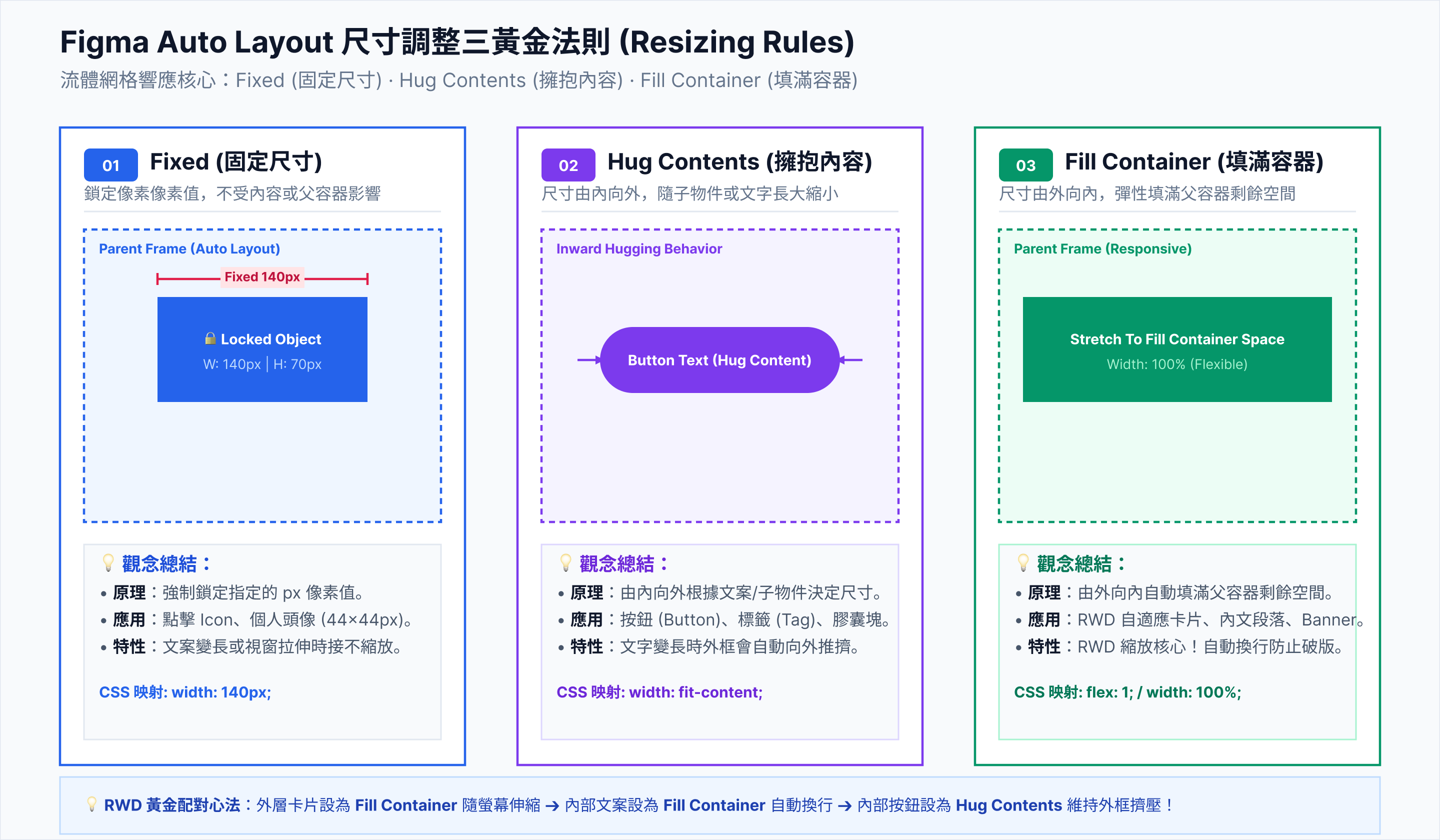
Figma 到 Code 的轉譯核心: 善用 Auto Layout (Shift+A) 設定方向、間距(Gap)與內邊距(Padding),並精確指定 Hug(包裹內容)與 Fill Container(填滿容器),即可讓 Claude 在 PART 3 無縫生成完全不跑版的 React + Tailwind CSS 程式碼。

案例類型與名稱 Hero 區塊 Auto Layout 設定
(Direction / Gap / Padding)
核心元件與尺寸規則
(Sizing Rules: Hug / Fill / Fixed)
RWD 手機端切換策略
(Desktop ➔ Mobile Adaptation)
01. 實體硬體
ErgoMinimal 護腰墊
Direction: Horizontal
Gap: 48px Padding: px-64 py-80
結構: 左側文字組合包,右側 3D 產品展示圖。
  • 左側文字 Frame: Vertical Fill Container (Gap=24px)
  • 標題與內文: Fill Container (自動折行)
  • CTA 按鈕組: Horizontal Hug Contents (Gap=16px)
  • 右側產品圖: Fixed Width (520px) Hug Height
  • 方向變更: Horizontal ➔ Vertical
  • 右側圖片: Fixed (520px) ➔ Fill Container
  • Padding 調整: px-64 ➔ px-20,py-80 ➔ py-40
  • 排序調整: 手機端圖片置於文字上方。
02. SaaS 軟體
AutoCollect 催款網
Direction: Vertical
Gap: 32px Padding: px-32 py-96
結構: 置中標題與 CTA,下方堆疊浮動玻璃卡片。
  • 頂部文案 Frame: Align: Center Fill Container
  • 玻璃卡片 Frame: Fill Container,啟用 Drop Shadow 與 1px Stroke。
  • 卡片內部 Grid: Direction: Horizontal 3 欄並排,全設 Fill Container
  • 導覽列: 選單按鈕 ➔ 轉為漢堡選單組件 (Hamburger)
  • 玻璃卡片 Grid: 3 欄並排 ➔ Vertical 單欄垂直堆疊。
  • 背景光暈: 縮小 Glow 圓形尺寸避免溢出螢幕。
03. 健康餐飲
CleanBite 無麩質餐
Direction: Horizontal
Align: Space Between Padding: px-64 py-64
結構: 左右分割版面,配合圓形美食遮罩照片。
  • 信任標籤 (Badges): Direction: Horizontal Hug Contents (Gap=12px)。
  • 美食圖片遮罩: Fixed Width (480px),Corner Radius 設為 999px (正圓)。
  • 特點清單: Vertical,內部 Icon 與 Text 設為 Horizontal (Gap=8px)。
  • 版面重排: 兩欄分割 ➔ 單欄,圖片置頂,文字移至下方。
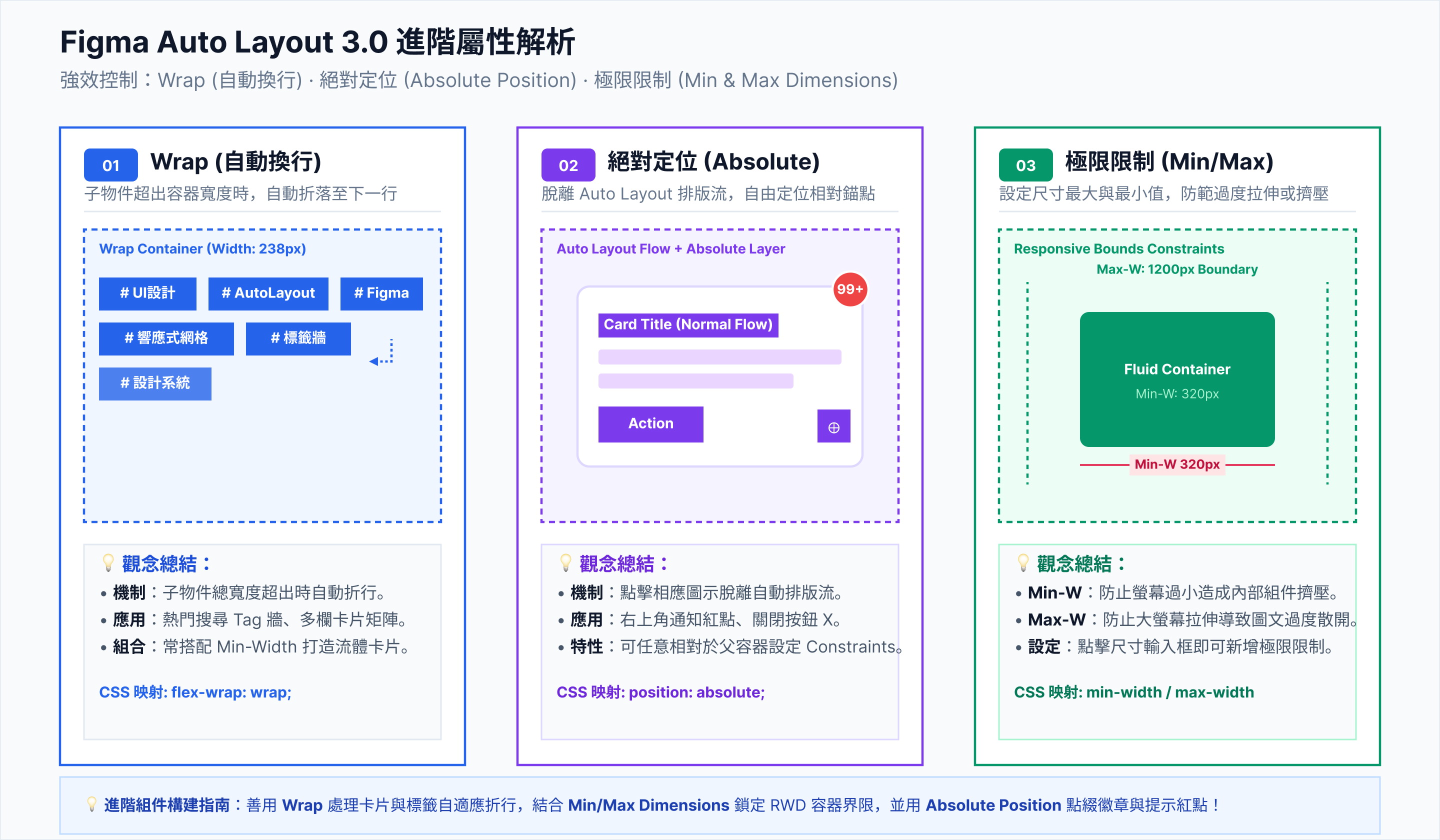
  • 信任標籤: 超出寬度時啟用 Wrap 或轉為水平滑動 (Horizontal Scroll)。
04. 寵物用品
SeniorCat 健檢貓砂
Direction: Horizontal
Gap: 40px Padding: px-48 py-64
結構: 溫馨主視覺與貓爪標籤、比較表格區。
  • 貓爪小標籤: Horizontal,Padding px=12, py=6,Radius=20px,背景 Hug
  • 對比表格區: 外框 Vertical Fill Container,內部每列設為 Horizontal (Space Between)。
  • 對比表格: 左右雙欄對照 ➔ 改為垂直手風琴 (Accordion) 折疊區塊。
  • 圖文比例: 手機端圖片高度固定為 280px,設定 Fill Container 寬度。
05. 數位產品
ExecSlide 簡報組件
Direction: Vertical
Align: Center Gap: 48px
結構: 頂部文案,底部懸浮 3D 簡報 Gallery。
  • Gallery 容器: Horizontal,勾選 Clip Content (模擬溢出隱藏)。
  • 簡報預覽卡片: Fixed (320px * 200px),Component Variant 建立 Hover 放大狀態。
  • CTA 區域: 按鈕 + 認證星級,設為 Vertical Hug Contents
  • Gallery 展示: 橫向溢出 ➔ 轉為觸控滑動卡片 (Touch Carousel)。
  • 標題字級: 48px ➔ 32px (設定相對縮放或 Breakpoint Variant)。
06. 美妝保養
Luxury Vegan Skincare
Direction: Horizontal
Padding: px-80 py-100 Align: Center
結構: 雜誌風優雅分割,左襯線體標題,右高光商品圖。
  • 襯線大標題: Serif 字體,Fill Container,Line Height 設為 1.2。
  • 膠囊按鈕: Horizontal,Padding px=32, py=14,Radius=999px (Pill shape)。
  • 成分卡片列: Horizontal (Space Between),3 卡片全設 Fill Container
  • Padding 縮減: px-80 ➔ px-24,py-100 ➔ py-48。
  • 成分卡片: 3 欄並排 ➔ Vertical 垂直堆疊,每卡片改為 100% 寬度。
07. 健身運動
Mindful Yoga App
Direction: Horizontal
Gap: 32px Padding: px-48 py-64
結構: 不對稱雙欄,搭配弧形背景與浮動數據標籤。
  • 浮動數據徽章: 父 Frame 設 Auto Layout,徽章啟用 Absolute Positioning 擺放於角落。
  • 弧形背景容器: 外框 Radius 設為 0px 0px 40px 40px。
  • 課程列表卡片: Horizontal (Gap=20px),內部圖片設為 Fixed Height (180px)
  • 絕對定位徽章: 關閉 Absolute Positioning ➔ 轉為普通 Flow 嵌入卡片內部。
  • 課程卡片: 水平滑動列 ➔ 單欄垂直排列。
08. 個人作品集
UI/UX Studio Portfolio
Direction: Vertical
Gap: 64px Padding: px-64 py-96
結構: 新粗獷主義 (Neo-Brutalist),超大字體與直向列表。
  • 動態字體 Frame: Vertical Fill Container,字級 64px,Letter Spacing -1px。
  • 方塊 CTA 按鈕: Radius=0px,Solid Stroke=2px,Padding px=28, py=16。
  • 作品列表 Row: Horizontal (Space Between),Padding py=24,Bottom Border=2px。
  • 字體級階: 64px ➔ 36px,確保手機端不發生單字異常斷行。
  • 作品 Row: 左右欄(專案名 / 分類)➔ 上下單欄對齊。
09. 頂級房產
Luxury Real Estate
Direction: Vertical
Align: Bottom Left Padding: px-80 py-80
結構: 全螢幕 100vh 沉浸式 Hero,暗色遮罩與金框。
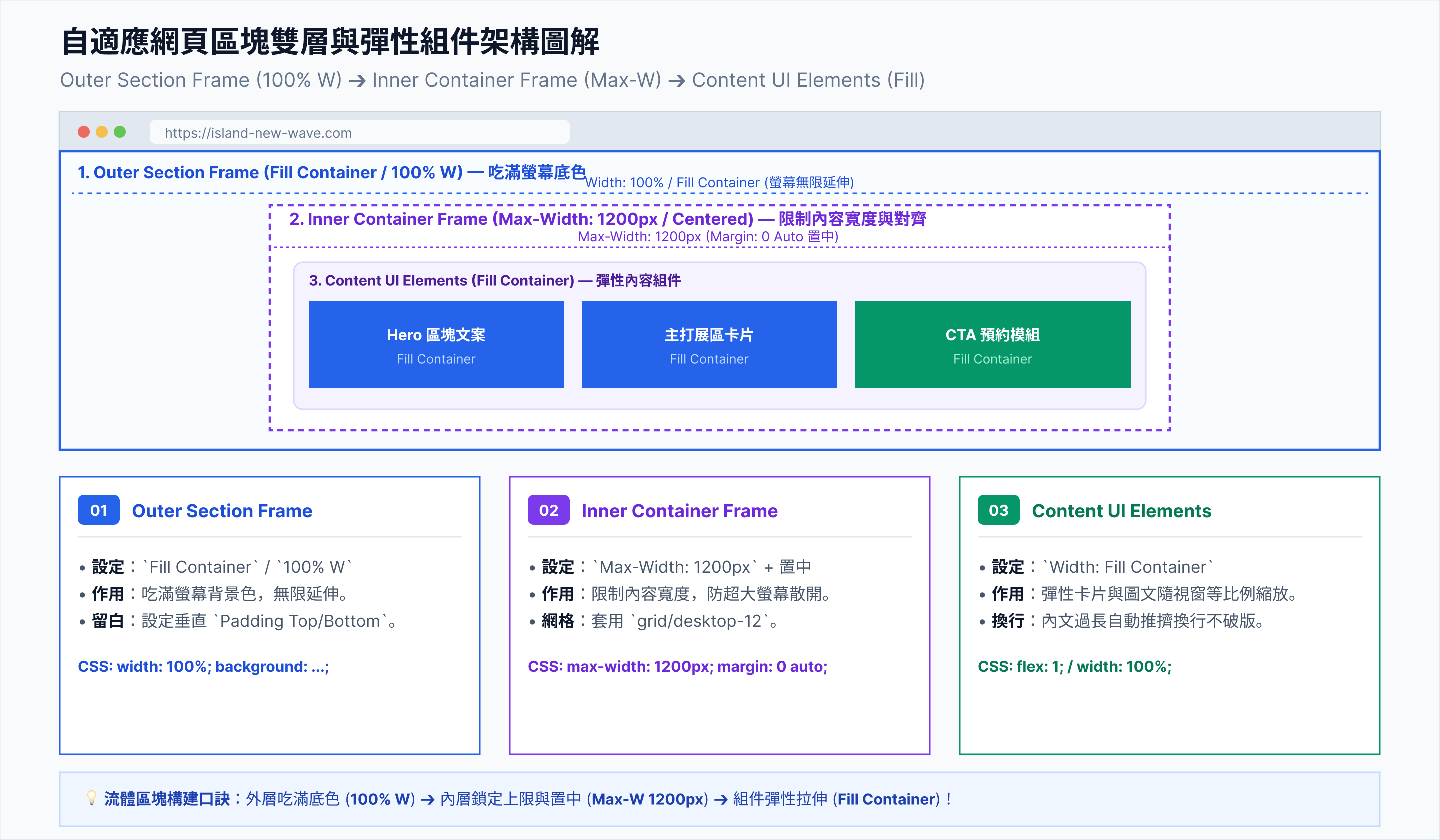
  • Hero 總 Frame: Fixed Height (800px) Fill Width
  • 黑色遮罩層: Absolute Positioning,填滿父容器 (Fill)。
  • 建案規格 Grid: Horizontal,4 個數據指標設為 Fill Container
  • Hero 高度: Fixed (800px) ➔ Hug Contents (避免手機螢幕過矮裁切內容)。
  • 規格 Grid: 4 欄橫排 ➔ 2x2 矩陣網格或單欄排列。
10. 永續服飾
Eco Apparel Store
Direction: Horizontal
Gap: 32px Padding: px-48 py-64
結構: 雜誌版面 (Editorial Grid),左模特大圖,右數據卡片。
  • 左側大圖: Fill Container Width,Aspect Ratio 鎖定 3:4。
  • 右側內容組件: Vertical Fill Container (Gap=24px)。
  • 購物卡片: Horizontal,含圖片 (Fixed 80px) 與價格/按鈕 (Fill)。
  • 雜誌網格: 不對稱雙欄 ➔ 單欄直向瀑布流。
  • 模特大圖: 寬度 100% 填滿,Aspect Ratio 調整為 1:1 或 4:3 節省高度。

・課後作業檢查清單

生成前端視覺作業整理單

請將 PART 1 的提案企劃,轉化為視覺 Moodboard、AI 圖像資產與完整 Figma UI 稿,準備接軌 PART 3 的網頁程式碼生成。

執行週次 單元主題與作業目標 使用的工具與分工 交付成果物 (Deliverables) 作業檢查狀態
W10 作業四:視覺對標與 Moodboard 建立
• 收集競品網站與定案 60-30-10 配色比例。
Pinterest 視覺靈感庫
Figma Moodboard 整理
1. Pinterest 靈感畫板連結
2. 色彩與字體規範卡

W11 作業五:AI 圖像與商業資產生成
• 撰寫提示詞生成 Hero 圖片、Icon 與去背資產。
ChatGPT DALL-E 3 生成
Remove.bg 去背工具
1. Hero 區塊高解析主視覺圖
2. 去背 PNG/SVG Icon 包

W12 ~ W13 作業六:Figma Auto Layout 網頁骨架
• 全面套用 Auto Layout 完成響應式 UI 設計。
Figma Auto Layout (Flexbox) 1. Figma 1x UI 設計稿連結
2. 導出 PNG 介面標註圖

🏆 單元最終完成物:
完成一份可供 AI 精確辨識(Design-to-Code Ready)的 Figma 網頁視覺藍圖,準備進入 PART 3 (Claude 導購網頁發布)。
Figma 響應式 UI 稿 準備對接 PART 3